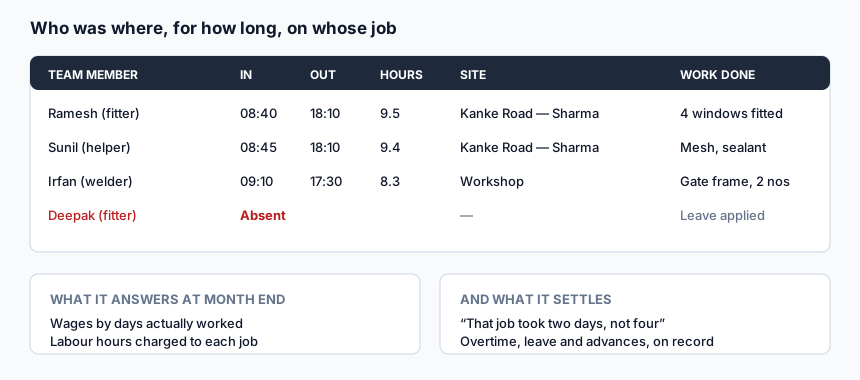
In a shop with four or five people, the wage register is usually a notebook and the allocation of who goes where is usually a phone call at eight in the morning. That works until two things happen at once: somebody disputes a day, and a customer asks why their job took four days when you quoted two.
Neither question can be answered from memory. Both can be answered from a record that took ten seconds a day to keep.
Features
Staff records
Each person on the team with their role, contact details, documents and joining date in one place rather than on a photocopy in a drawer.
Attendance with in and out times
Present, absent, half day, with times — so hours worked are a figure rather than an impression.
Allocation to sites and jobs
Who is at which site today. At the end of a job you can see how many man-days it actually consumed, which is the number that tells you whether your quoted labour was right.
Daily reports from the field
Staff submit what was done that day. Four windows fitted, mesh and sealant, gate frame welded. A week of these is a far better picture of the shop than a week of phone calls.
Teams and task allocation
Group people into teams, assign tasks and see what is completed.
Leave requests
Applied, approved or rejected, on record — so the month-end wage calculation is not a negotiation.
Location logging for field staff
Where a field team member was when they marked attendance or filed a report.
Benefits
- Wages come from a register. Days worked, half days, leave and overtime are recorded as they happen rather than reconstructed on the 30th.
- You learn what a job really costs in labour. Most small shops quote labour from a feeling. Man-days per job turns the feeling into a number.
- Disputes end. "You were absent on the 12th" is a record, not an accusation.
- Site allocation stops being a daily phone round.
- You can see who is productive, which matters more as a shop grows past the point where the owner watches everything.
How it works
- Add your staff with their roles.
- Mark attendance daily, or let field staff mark their own.
- Allocate people to sites for the day.
- Collect daily reports of what was done.
- Approve leave through the request flow.
- Use the month's register for wages, and the man-days per job for your next quotation.
Who this is for
Fabrication shops with employed fitters, welders and helpers; installation companies running more than one site a day; and owners who currently answer "how many days did Ramesh work this month" by thinking hard.
Frequently asked questions
Is staff management free?
No. Staff accounts, attendance, teams and daily reports are part of a paid plan, because they add user accounts beyond your own. Quotations, measurements, invoices, site visits and payment tracking are free. See pricing.
Do my staff need their own logins?
For self-marked attendance and daily reports, yes. You can also mark attendance for the whole team yourself if your workers do not use smartphones.
Does it calculate salary?
It gives you the attendance register, hours and leave that salary is calculated from. The payroll decision — rates, deductions, advances — stays yours.
Does it track location all day?
No. Location is logged at the points where a staff member acts — marking attendance, filing a report — not continuously in the background.
Can I see labour cost against a particular job?
You can see who was allocated to a site and for how long, which is what you need to work out the labour that job consumed.
What if somebody works at two sites in a day?
Allocation is per day per person; split days are recorded in the daily report so the history is accurate.
Related
Site visit management · Payment tracking · What is free and what is paid · Paper vs software
Start using it
Create an account, open a quotation, and see whether the numbers come out the way you work. Nothing is charged for the tools listed above, and there is no trial clock running in the background.
Create a free account · See every tool · What is free and what is paid