Most small fabrication shops know roughly what they billed last month. Very few can say, without opening a notebook, which five customers owe them money and how long it has been. That gap is where working capital quietly disappears — not in bad debts, but in invoices nobody got round to chasing.
Features
Payments recorded against the job
Each receipt sits against the invoice and the customer, with the date, the amount and how it was paid. Not a line in a diary.
Staged payments, the way this trade actually works
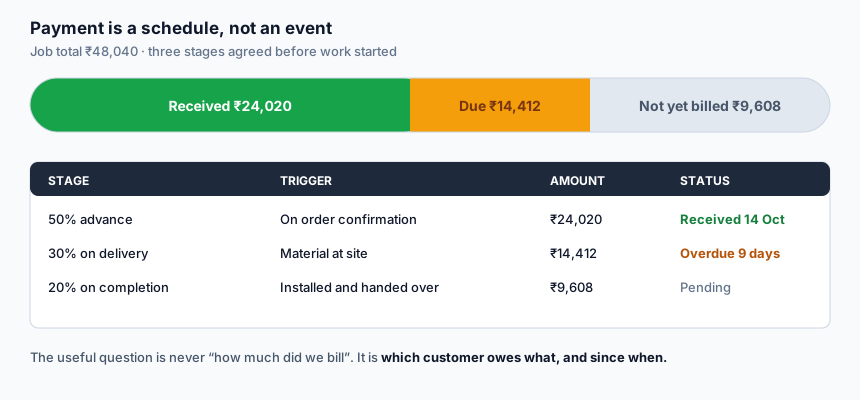
Advance on order, a stage on delivery, the balance on completion. Record what was agreed and tick off each stage as it arrives, so the remaining amount is always correct.
An outstanding list, oldest first
The useful screen is not total revenue. It is who owes what, sorted by how long it has been owed.
Part payments handled properly
A customer paying ₹10,000 against a ₹14,412 stage leaves ₹4,412 showing — not a cleared invoice and a mental note.
Today, this month, and by customer
Collection figures for the day and the month sit on your dashboard, and each customer has their own payment history.
UPI collection
Generate a UPI payment request so a customer standing in front of you can pay by scanning, and the reference lands against the job.
Benefits
- You chase the right people. An ordered list of who is overdue, and by how many days, turns collection into a twenty-minute job on a Monday.
- Awkward conversations get easier. "Your balance is ₹14,412 from the delivery stage on 14 October" is a different conversation from "you owe me something".
- You stop starting new work for customers who have not paid for the last job.
- Cash position becomes visible. Billed, received and still to bill are three different numbers, and knowing all three is how you decide whether to buy material this week.
- Receipts exist. Which prevents the disagreement about whether the advance was ₹20,000 or ₹25,000.
How it works
- Agree the stages before work starts and record them on the quotation terms.
- Raise the invoice for the stage that has fallen due.
- Record each payment as it arrives, with the date and method.
- Watch the outstanding list rather than the revenue total.
- Follow up the oldest first.
A note on payment terms that actually get paid
Three things make the difference in this trade, and none of them are software:
- Take a real advance. Material is bought before anything is earned. An advance that does not cover the material is not an advance, it is a loan you are making to the customer.
- Tie each stage to an event the customer can see — material delivered, installation complete — not to a date. Dates slip and get argued about; events do not.
- Ask on the day it falls due, not a fortnight later. The longer a balance sits, the more it feels to the customer like something negotiable.
Who this is for
Fabrication and installation businesses carrying balances across several jobs; shops where the owner is also the one chasing payment; and anyone whose outstanding figure currently lives in their head.
Frequently asked questions
Is payment tracking free?
Yes, along with invoices, quotations, measurements and site visits.
Does it take payments from customers directly?
It generates a UPI payment request a customer can scan, and you record the reference. It is not a payment gateway and does not hold or settle money — funds go straight to your own UPI account.
Can I record a cash payment?
Yes, with the date and amount. The method is recorded alongside it.
Does it send payment reminders automatically?
No. Reminders over WhatsApp use sending credits, which are a paid item, and we would rather you saw the overdue list and decided who to call than have the system message customers on its own.
Can I see how much a single customer has paid over two years?
Yes. Payment history is held against the customer, across jobs.
What about jobs quoted but not yet billed?
Those sit as quotations, not as receivables. The outstanding list only counts what has actually been invoiced, which is the number that matters for collection.
Related
GST invoice and billing · Staff management · Getting paid on time · Pricing
Start using it
Create an account, open a quotation, and see whether the numbers come out the way you work. Nothing is charged for the tools listed above, and there is no trial clock running in the background.
Create a free account · See every tool · What is free and what is paid