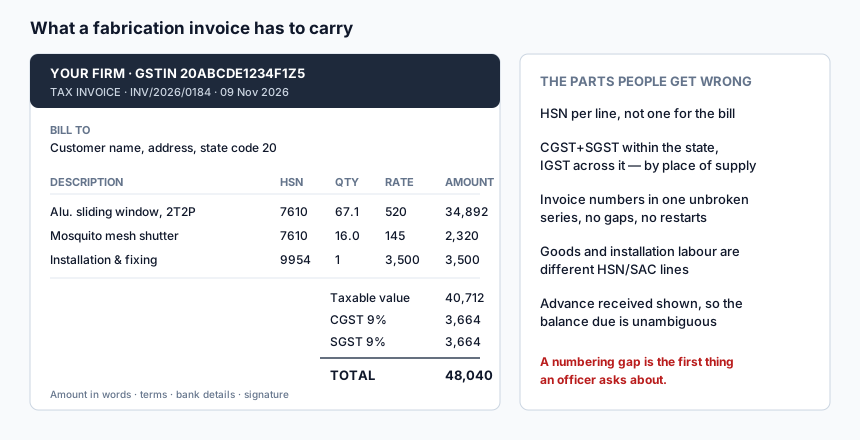
A fabrication invoice is harder than it looks. Goods and installation labour are different line types with different codes. The tax split depends on where the customer is. The advance you already took has to show, or the customer pays the whole amount again and asks for it back. And the invoice numbers have to run in one unbroken series, because a gap is the first thing anybody official asks about.
Features
Per-line HSN and SAC
Aluminium sections, mesh shutters and installation labour do not share a code. Each line carries its own, which is what makes the document correct rather than merely tidy.
CGST and SGST, or IGST, by place of supply
Within your state the tax splits; outside it, it does not. The invoice reflects the customer's state rather than a setting you have to remember to change.
Advances shown against the bill
What was received and when, so the balance due is unambiguous.
Your own format
Logo, firm name, GSTIN, address, bank details, terms, signature block and the wording of your payment stages are set once in the invoice format settings.
A continuous invoice series
Numbers come from a sequence rather than from memory, so there are no duplicates and no gaps.
Raised from the quotation
The approved quotation becomes the invoice with its lines intact. The commonest billing error in a small shop is a retyped line that does not match what was agreed.
Separate formats for fabrication, product and service work
A fabrication invoice, a product sale and a service bill look different and are configured separately.
PDF and share
Download or send. The customer gets a document, not a photo of a book.
Benefits
- Correct tax, without thinking about it twice. The split follows the place of supply instead of habit.
- The bill matches the quote. Which removes the single most common argument at the end of a job.
- Your paperwork stands up. One series, correct codes, advances shown.
- Faster to raise than writing one out — and legible.
- Everything is retrievable. Last year's invoice for a repeat customer is two clicks away.
How it works
- Set your invoice format once — letterhead, GSTIN, bank details, terms.
- Open the approved quotation and raise an invoice from it.
- Adjust quantities to what was actually supplied or measured.
- Check the HSN or SAC on each line.
- Record any advance already received.
- Generate, send, and track the balance in payment collection.
Who this is for
Registered fabricators billing with GST; shops that supply and install and therefore have both goods and service lines; and anyone currently writing invoices in a book and copying them into a spreadsheet afterwards.
Frequently asked questions
Is the GST billing software free?
Yes. Invoices and invoice formats are in the free account.
Does it file my GST returns?
No. It produces compliant invoices and keeps them in order. Filing is done by you or your accountant, and the invoice records are what they need.
What HSN code should I use for fabrication?
It depends on what you are supplying — aluminium builders' joinery, iron or steel structures, and installation services all sit under different headings, and the correct code is a question for your accountant rather than for software. The invoice lets you set the code per line so you can apply their advice exactly.
Can I bill without GST?
Yes. If you are not registered, raise the document without tax lines.
Can I change an invoice after sending it?
Invoices are sequential records, so corrections should be handled the way your accountant tells you — usually a credit note or a revised document — rather than by quietly editing a number that has already gone to a customer.
Does it handle part-billing a job?
Yes. Bill against stages, and the outstanding balance is tracked in payment collection.
Related
Payment collection and outstanding · Aluminium quotations · Steel fabrication quotations · Getting paid on time
Start using it
Create an account, open a quotation, and see whether the numbers come out the way you work. Nothing is charged for the tools listed above, and there is no trial clock running in the background.
Create a free account · See every tool · What is free and what is paid